Modifed OCuLink Cable for PCIe devices to work with OCuLink Ports - X570D4I-2T (Possibly Other ASRock Motherboards)
We’re not responsible for any damage that may happen to your board! Only follow this guide if you understand the risks and are confident in doing it!
This Guide was written by our Community Member u/Calpulz.
Intro
For the past few weeks, I have been trying to get PCIe devices such as GPU, HBA, WiFi Cards, etc to work through my ASRock Rack X570D4I-2T OCuLink port.
I am building a custom ITX server and require more SATA drives then the 8 this motherboard supports. So I want to run a HBA through the OCuLink port using a OCuLink to PCIe x16 adapter board (x4 bandwidth).
However after trying various different cables and adapters, nothing worked through the motherboards OCuLink port apart from a cable mentioned numerous times on diferent forms. Supermicro 55cm OCuLink to U.2 PCIE with Power Cable (CBL-SAST-0956).
So I purchased one along with some adapters to find out whats different about this cable from Supermicro. I then modified a standard OCuLink cable so that it works with the motherboard and PCIe x16 adapter board.
- Motherboard: ASRock Rack X570D4I-2T
- CPU: AMD Ryzen 9 5900X
Problem Overview
PCIe devices failing to recognize or function when connected through an OCuLink port on the motherboard using a standard OCuLink x4 cable (male to male, SFF-8611 to SFF-8611).
However, when using a specialized Supermicro cable designed for U.2 SSDs (OCuLink to U.2) along with a series of adapter boards, PCIe devices are detected and operate correctly.
Detailed Setup and Symptoms
Non-Working Setup Using Standard OCuLink Cable: Connecting PCIe devices through an OCuLink x4 cable directly to an OCuLink to PCIe x16 slot adapter results in failure of device recognition or operation.
Working Setup Using Supermicro Cable: Using a Supermicro cable (OCuLink to U.2) and a series of adapters (U.2 to M.2, M.2 to OCuLink), then reconnecting to a standard OCuLink cable to the PCIe x16 adapter, the devices work correctly. This setup essentially replicates a male-to-male OCuLink cable using multiple adapters.
Technical Analysis and Resolution
Pinout Differences Identified: Using a multi-meter, significant differences in pinouts were found between the standard OCuLink cable and the Supermicro cable with multiple adapters. These discrepancies suggest unique wiring configurations in the Supermicro cable that affect functionality.
Modification of Standard OCuLink Cable: By modifying the pinout of a standard OCuLink cable (specifically cutting certain traces and bridging others), it was possible to replicate the functional characteristics of the working setup. This modification allowed the standard cable to work correctly with the OCuLink port and the PCIe adapter board.
Note: The modified cable is now directional, and reversing its direction has not been tested and could cause damage!!!
Detailed Analysis and Findings
In a typical OCuLink cable, A pins 1-21 are connected to corresponding B pins at the other end and vice versa, with some exceptions for ground pins. Some OCuLink cables differ and A1, A21, B1, B21 will not be connected. My specific cable had these connected.
Analysis using a multi-meter, physical examination of the cable’s internal PCB and comparison to a standard OCuLink cable revealed problematic connections at pins A1, A9, A10, A21, B1, B11, B13, and B21. (Figure 2 & 3)
Modifications to Standard OCuLink Cable
All changes were made to one end of the standard OCuLink cable, specifically the male end connecting to the motherboard, making the cable now directional! (Figure 1, Figure 4, Figure 5)
- Unclip plastic casing around the male connector to reveal the PCB and pins
- A1, A9, A10, A21, B1, B11, B13, B21 - Disconnected by snipping wires and cutting traces
- B13 - Connected to ground by bridging to adjacent ground pin B14, soldering pins together
- Superglue was used to cover over any exposed copper when cutting PCB traces
- Clip back together the casing around the male connector
Final Result
With these modifications, the standard OCuLink cable replicates the functionality of the custom assembly, allowing PCIe devices to operate correctly using the modified cable and PCIe adapter board. (Figure 6)
The modified end of the cable must always connect to the motherboard.
Links
- Supermicro Cable - https://store.supermicro.com/supermicro-55cm-oculink-to-u-2-pcie-with-power-cable-cbl-sast-0956.html
- Standard OCuLink Cable - https://amzn.eu/d/3sMGvP2
- OCuLink to PCIe x16 (x4) - https://amzn.eu/d/8iHGcK0
- U.2 to M.2 Adapter Board - https://amzn.eu/d/emLWG5c
- M.2 to OCuLink Adapter Board - https://amzn.eu/d/7eNcmkc
References

Figure 1 - Standard OCuLink Cable and Modified OCuLink Cable pinout

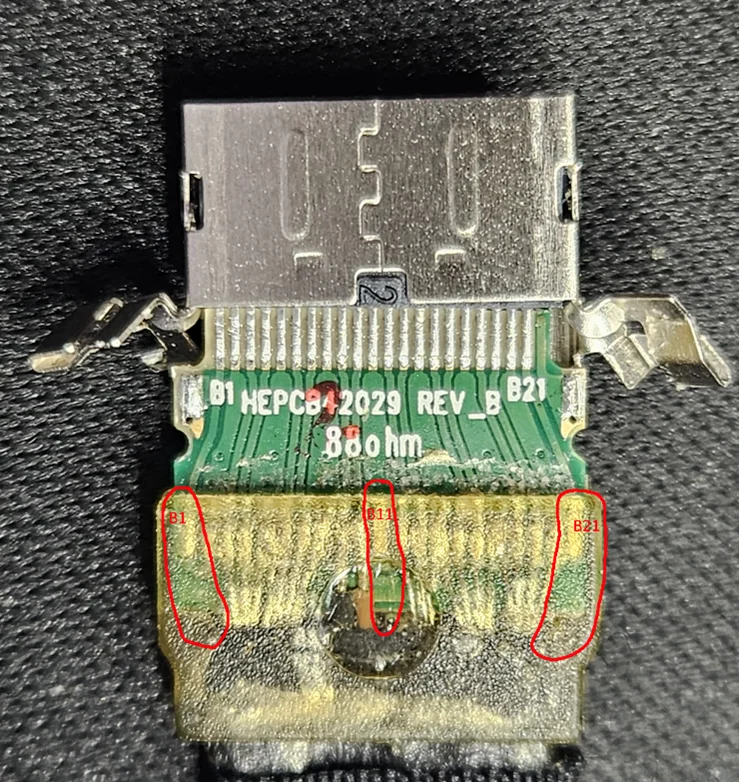
Figure 2 - Examine Supermicro OCuLink to U.2 Cable (missing connections) - B Side
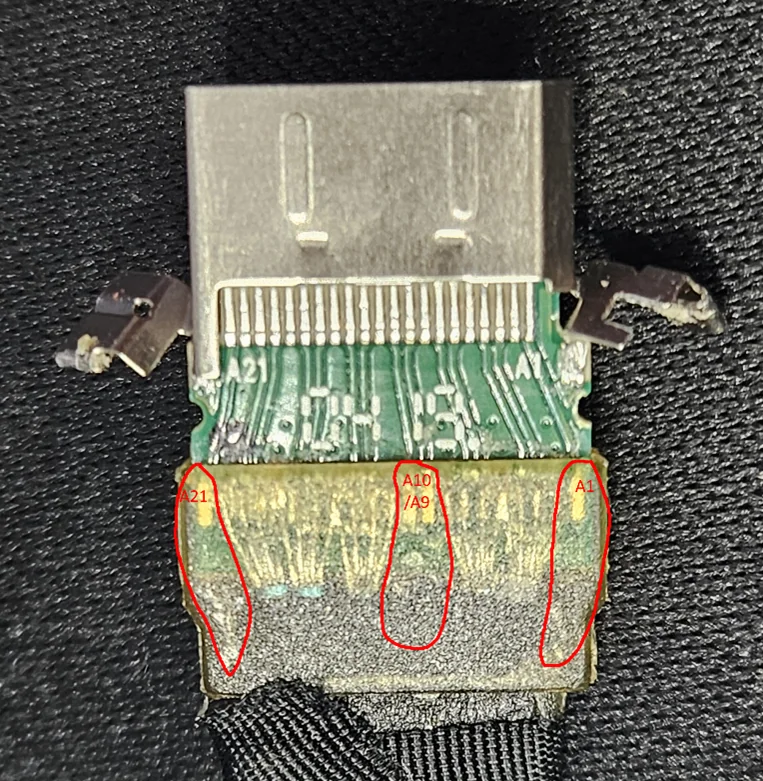
Figure 3 - Examine Supermicro OCuLink to U.2 Cable (missing connections) - A Side

Figure 4 - Modifications to Standard OCuLink Cable - B Side

Figure 5 - Modifications to Standard OCuLink Cable - A Side

Figure 6 - Final Assembly with modified OCuLink cable